AWS Lambda Container Image support with CDK
AWS Lambda Container Image support with CDK
During AWS Re:invent 2020, AWS announced Container Image support for deploying Lambda functions.
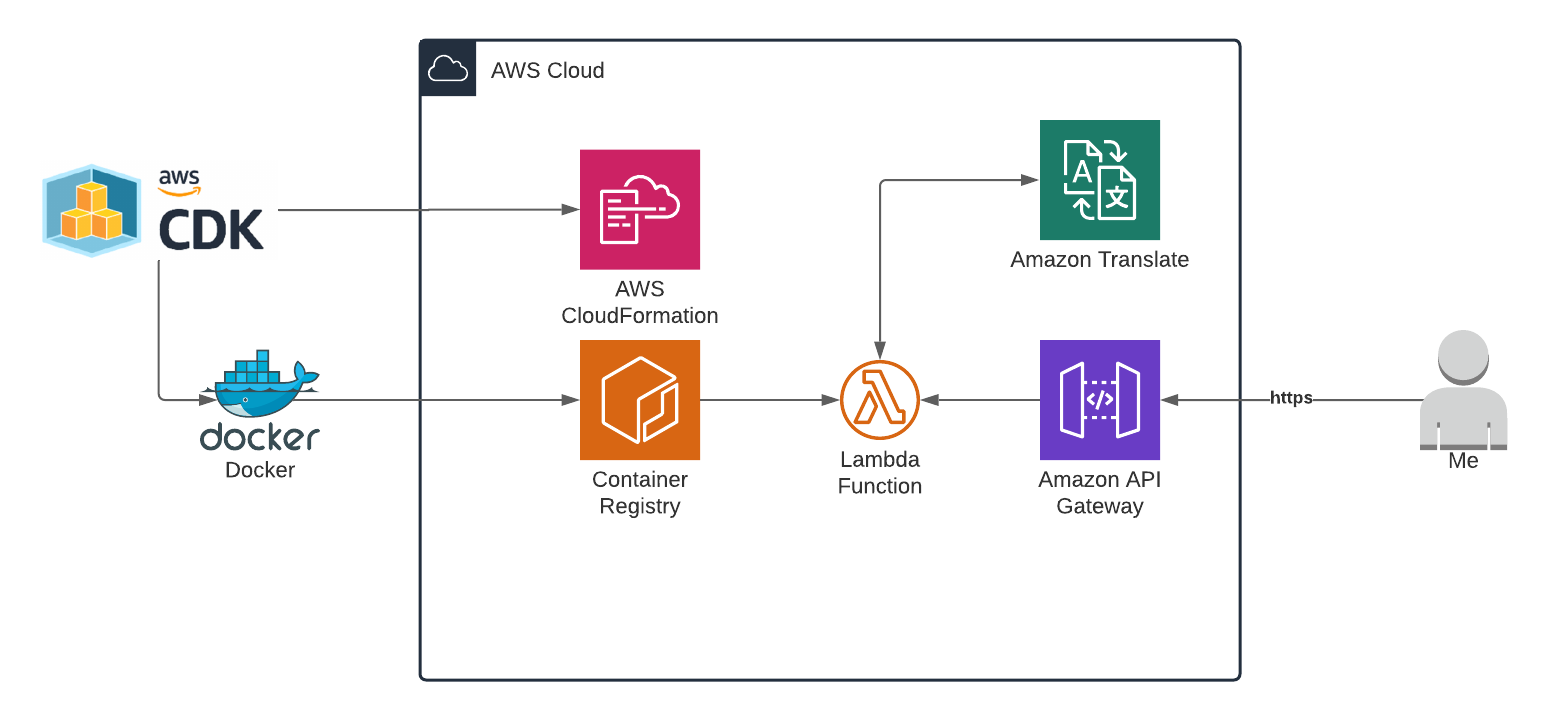
My plan is to try to use the AWS Cloud Development Kit (CDK) to deploy a python Lambda function as a container image. To proof the functionality, I will build the following:
- A Lambda function that translates a string from English to Italian using Amazon Translate
- An API Gateway which calls this Lambda so I have a way to test this with a browser
Creating the function
I’m using the CDK DockerImageFunction construct to create the function from a local Dockerfile.
The only thing I need to do in my (typescript) code:
const dockerfile = path.join(__dirname, "../src");
const backend = new Lambda.DockerImageFunction(this, "function", {
    code: Lambda.DockerImageCode.fromImageAsset(dockerfile)
});
backend
The code above loads the Dockerfile from “../src” to create the container image with Docker. This construct also takes care of setting up an Amazon Elastic Container Registry (ECR) to store the container image and setup the Lambda executing role for the function.
The Dockerfile:
FROM public.ecr.aws/lambda/python:3.8
COPY src/ .
CMD [ "lambda.handler" ]
The FROM retrieves the base image from the public ECR which has been prepared for using with Lambda containers. The COPY command copies the Python lambda code to the container. The CMD runs the Lambda handler when the process is started.
Linking the Lambda function to apigateway is pretty simple:
new apigateway.LambdaRestApi(this, 'myapi', {
    handler: backend,
});
Local testing
The process of updating the Lambda is now:
- Update local code
- “cdk deploy” will push the update container image to ECR and replace the Lambda function
- After the stack update finishes, I can test the URL of the API Gateway
This process takes almost 2 minutes, which is a lot of time if you want to try a small change.
So, we want to be able to run the container in a local Docker engine. We can do this like this:
docker run -p 9000:8080 -d -v ~/.aws:/root/.aws -e AWS_PROFILE='ricardo' 27a2f4510276
The AWS Lambda Runtime Interface Emulator (RIE) is a proxy for the Lambda Runtime API that allows you to locally test your Lambda function packaged as a container image. The RIE is already packaged in our container so we don’t need to do anything for that.
The docker run above does the following:
- exposes port 9000 locally to port 8080 on the container (this is the RIE webserver)
- “-d” runs the docker in the backgroun
- with “-v” I’m mounting my local AWS credentials to the container
- I’m setting my AWS_PROFILE to tell the AWS SDK which profile to use for my credentials
- 27a2f4510276 is the name of the image that recently created
By going to this URL, I can test my function locally:
curl -XPOST "http://localhost:9000/2015-03-31/functions/function/invocations" -d '{}'
The “/2015-03-31/functions/function/invocations” part is required to talk to your function.
In this case, the function needs permissions to contact the AWS Translate service but since my AWS credentials have full admin access I don’t need to worry about not having enough permissions (But you could argue this is not the best practise to run my container with Admin privileges).